Reading a Fashion Digital Carousel Through Its Changing Viewpoints
Read a fashion digital carousel through its changing viewpoints to see how crop, scale, and order shape the way a garment is presented on screen.
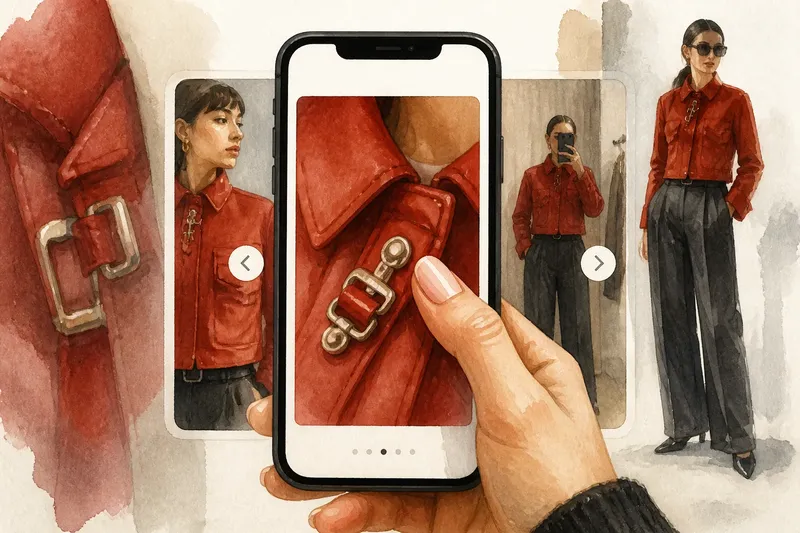
A thumb pauses over a fashion digital carousel when a close view of a jacket’s metal clasp fills the screen. One swipe reveals the model wearing it; another shifts the view to a fitting-room mirror. The sequence is not simply several photographs grouped together. Its changing viewpoints determine how a garment becomes legible on a small screen.
Rather than search for a hidden story, look at the mechanics of presentation: how close the camera comes, what part of the garment remains visible, and how the screen’s frame limits the view. These choices connect fashion photography to the habits of scrolling, tapping, and comparing images on a phone.
What does the screen reveal or conceal?
Start by viewing the carousel once at its ordinary pace, without stopping to interpret every image. Notice whether you can identify the garment, its shape, and how it is worn. Then look again and record visible details separately from your impressions. “The sleeve covers the wrist” is an observation; “the look feels severe” is an interpretation.
Mobile framing can make one feature unusually prominent. A face may occupy more of the screen than a coat, or a close crop may show fabric texture while hiding the garment’s overall shape. Neither is automatically a flaw. The useful question is what the frame makes easy to see and what information it postpones.
How do crop and scale alter a garment?
Compare a close-up with a wider view of the same item. A close crop can show stitching, a buckle, or the surface of a fabric, but it may leave the item’s proportions unclear. A full-length view supplies context, though small details can disappear at phone size.
Look for shifts in distance as well as changes in subject. If the camera moves from a shoe to a full outfit, the viewer must reconsider how the shoe relates to the rest of the styling. If several frames stay at the same scale, small changes in pose or drape may become easier to compare. Note the visible difference before deciding whether the repeated view adds anything.
Imagine a carousel that begins with a tightly framed red cuff, follows with a waist-up portrait, and ends with a full-length view of the outfit. The starting information is the cuff’s color and texture, while the outfit’s silhouette is initially hidden. As you record each frame, the answer becomes clearer: the portrait connects the cuff to the jacket, and the final view shows how that jacket sits with the trousers. The tradeoff is that the opening delays the overall shape in exchange for directing attention to a small detail.
What do the image choices change?
Why does a close crop feel different from a full-length view?
A close crop concentrates attention on a feature such as a seam or accessory, while a full-length view shows proportion and styling context. Compare both before deciding whether a detail is central to the presentation or simply one part of it.
Can a phone screen change how color appears?
Screen brightness, display settings, and surrounding light can affect how a color looks to a viewer. Describe the visible color cautiously, and avoid treating a phone image as a reliable guide to the exact shade of a garment.
What should I notice in a mirror photograph?
Check which parts of the outfit the reflection includes and whether the phone, room, or mirror edge obscures anything. A mirror view can make the act of dressing part of the image, while also changing the angle and clarity of the garment.
How can I tell whether a detail is easy to read?
View the image at the size you normally use and identify the feature without zooming. If its shape or placement is unclear, record that limitation rather than guessing what the image intends to show.
Which observations should guide a closer look?
Use a short record to keep your reading grounded. For each item, note what you can see and choose the next action according to that observation:
- Garment identity: Check whether the main item is recognizable in the first frame; if it is, note what identifies it, then compare that feature with later views; if it is not, record what remains unclear and see whether a later frame supplies context.
- Crop: Check whether the frame cuts off a sleeve, hem, or accessory; if it does, note the missing area and look for a wider view; if it does not, compare how much of the outfit is visible with the detail shown.
- Scale: Check whether a fabric detail remains visible at ordinary phone size; if it does, note its location; if it does not, avoid making claims about its construction and rely on the wider silhouette.
- Color: Check whether the garment’s color appears consistent across frames; if it does, describe the repeated appearance; if it changes, note the lighting or screen conditions as possible influences and avoid calling either view definitive.
- Reflection: Check whether a mirror, phone, or room edge blocks part of the outfit; if it does, identify the obscured area and seek another angle; if it does not, compare the reflection’s viewpoint with the other frames.
- Caption: Check whether the caption names a designer, material, or styling detail; if it does, keep that information separate from what the image itself shows; if it does not, describe only visible evidence and leave uncertain details unresolved.
It is not worth the effort to infer a garment’s exact material from a small, compressed image or to treat every crop as a clue to a larger narrative. A screen can sharpen attention in one place while making another feature harder to judge.
Reading a fashion digital carousel through its changing viewpoints clarifies what each frame contributes: a close view can make construction visible, a portrait can connect detail to styling, and a wider view can restore proportion. When a feature remains uncertain, name that uncertainty; it is more useful than allowing a small screen to make the decision for you.